THE PLATFORM

Connected workspaces.
A shared operational picture.

Explore the product illustrations and all 22 modules. Choose the workflow your team needs first.
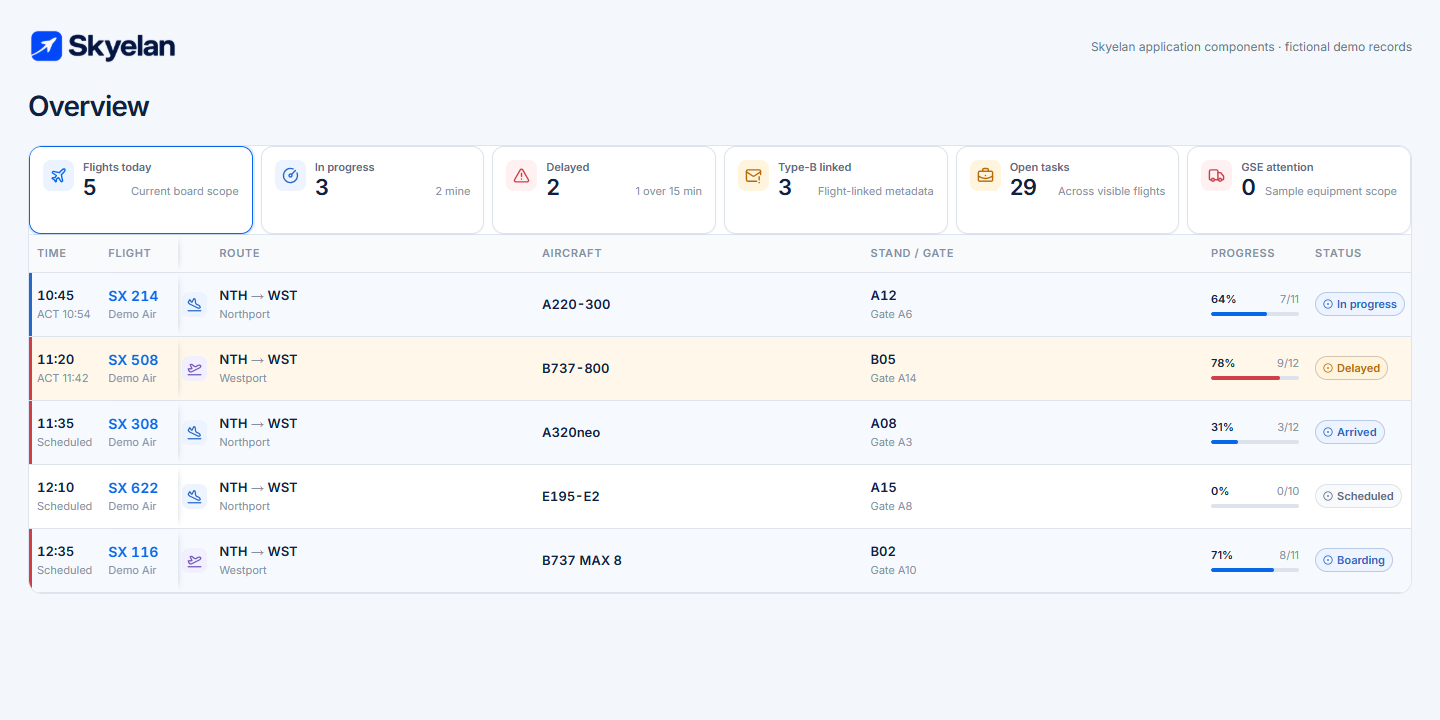
Actual Skyelan Overview table and summary components rendered with fictional flight records
Actual Skyelan application components, rendered with fictional demo records. Select the image for the full-size view.
Real-time operationsStation-scoped accessComplete audit trailMobile and tablet readyOffline-capable field work

Space for your
customer & partner network

Customer logo
Customer logo
Partner logo
Partner logo

THE OPERATING PICTURE

Control the entire turnaround
from one workspace.

See what is happening, what is ready and what needs attention —
across every flight, team and stand at your station.

Daily Flight PlanNorthport · NTH
Live06:42 UTC
15 Sep 2026All times UTC
Scheduled flights24 12 arrivals / 12 departures
Active turnarounds8 Live at your station
Needs attention2 Owners assigned
Completed flights14 All work signed off
Sample flights

Swipe to explore the flight plan →

FlightRoute / aircraftArrivalDepartureStand / gateStaffGSETurnaroundStatus
SX 214Aster Air
NTH → WSTA320 · DEMO-X1406:20STA / ETA07:10STD / ETDB12Gate 086 / 64 / 4
76%
In progress
SX 508Aster Air
EST → NTHE190 · DEMO-X0807:25STA / ETA08:10STD / ETDB07Gate 045 / 53 / 3
54%
In progress
SX 308Meridian Demo Air
NTH → STHA320 · DEMO-X3806:50STA / ETA07:40STD / ETDB09Gate TBC5 / 63 / 4
32%
Attention
SX 622Meridian Demo Air
WST → NTHB738 · DEMO-X6208:05STA / ETA08:55STD / ETDB04Gate 066 / 64 / 4
0%
Scheduled
SX 116Aster Air
NTH → ESTA319 · DEMO-X1605:10STA / ETA06:00STD / ETDB02Gate 025 / 53 / 3
100%
Done
SX 308 · Gate confirmation requiredOwner: Nora Bell · Due 06:55
Station-scoped operational viewIllustrative workspace · Fictional data
Arrivals & departures Staff & GSE assignments Delays & operational alerts Live completion status

ONE FLIGHT. ONE SHARED WORKSPACE.

Every team.
One version
of the flight.

Bring the full turnaround together — from the first assignment to the final sign-off. No separate threads. No missing context.

  • Flight details, milestones and task progress in one place.
  • Assigned people, equipment and services connected to the same flight.
  • Operational messages, documents and audit history that stay with the work.
Explore the flight workspace
Turnaround workspaceDEMO

SX 214

In progress

Northport Westhaven

Aster Air · A320 · DEMO-X14
STAND B12GATE 08
On-block06:20
Ground servicesIn progress
Boarding06:50
Off-block07:10
Turnaround completion
76%
Aircraft on-blockNora Bell · Flight coordinator
06:20Done
Ground power connectedMaya Reed · GSE technician
06:24Done
Baggage loadingEvan Cole · Ramp coordinator
07:00In progress
Boarding position readyLeo Rowan · Passenger services
06:50Open
Latest operational messageStand confirmed as B12. All assigned teams share this update.
06:31
YOUR SHIFT. IN YOUR POCKET.
06:42
▮▮▮
Ops
Northport · NTH

Good morning, Evan.

My Shift

06:00–14:00Ramp team A
4 Flights6 Tasks2 Done

What to do now

By priority
NEXT UPDue 06:50

Prepare boarding position

SX 214 · Stand B12 · Gate 08

Open

Confirm baggage loading

SX 214 · Due 07:00

In progress

Confirm stand access

SX 308 · Due 07:15

Attention
Shift handover

2 notes from the previous team

My shift Flights Messages
Continuity between shifts

Notes, open work and next steps
travel with the handover.

Skyelan Agent Mobile workspace

SKYELAN AGENT

Every employee knows what to do next.

A focused mobile workspace for the people doing the work. Give every employee a clear view of their shift, assigned flights and next priority.

A shift that makes sense

See assigned flights, times and responsibilities without searching across systems.

The right task, at the right time

A “What to do now” queue organizes work by urgency and scheduled time.

A clear handover

Carry open tasks and essential operational notes into the next shift.

OpenIn progressAttentionDone

SKYELAN GSE

Equipment checks
built for the ramp.

Give field teams a dedicated, high-contrast workspace for inspections, faults and equipment readiness — even when connectivity is unreliable.

01

Get straight to the equipment

Choose a station, sign in with a PIN and find the right asset.

02

Inspect, measure and record

Complete daily or technical checks. Add readings, comments and photos.

03

Keep unsafe equipment out of service

Record faults, follow repair status and block equipment use when required.

Ready for unreliable connections

Save field work locally and sync queued changes when connectivity returns.

GSE
NTH
PIN session · Maya Reed

GROUND POWER UNIT

GPU-014

Northport · Ramp zone B
Serviceable
Brakes & controlsCheck response and parking brake
Cables & connectorsNo exposed wires or damaged plugs
Record the measured value
V
equipment-check-01.jpg
Offline · 2 pending Syncs when connected
Large tap targets. Clear status labels. A visible sync queue.

ONE PLATFORM. BUILT FOR THE FIELD.

The right screen.
Right where the work happens.

Desktop oversight. Mobile execution. Dedicated Android APK versions for GSE and FLB bring focused workflows to the tablets your teams use on the ramp.

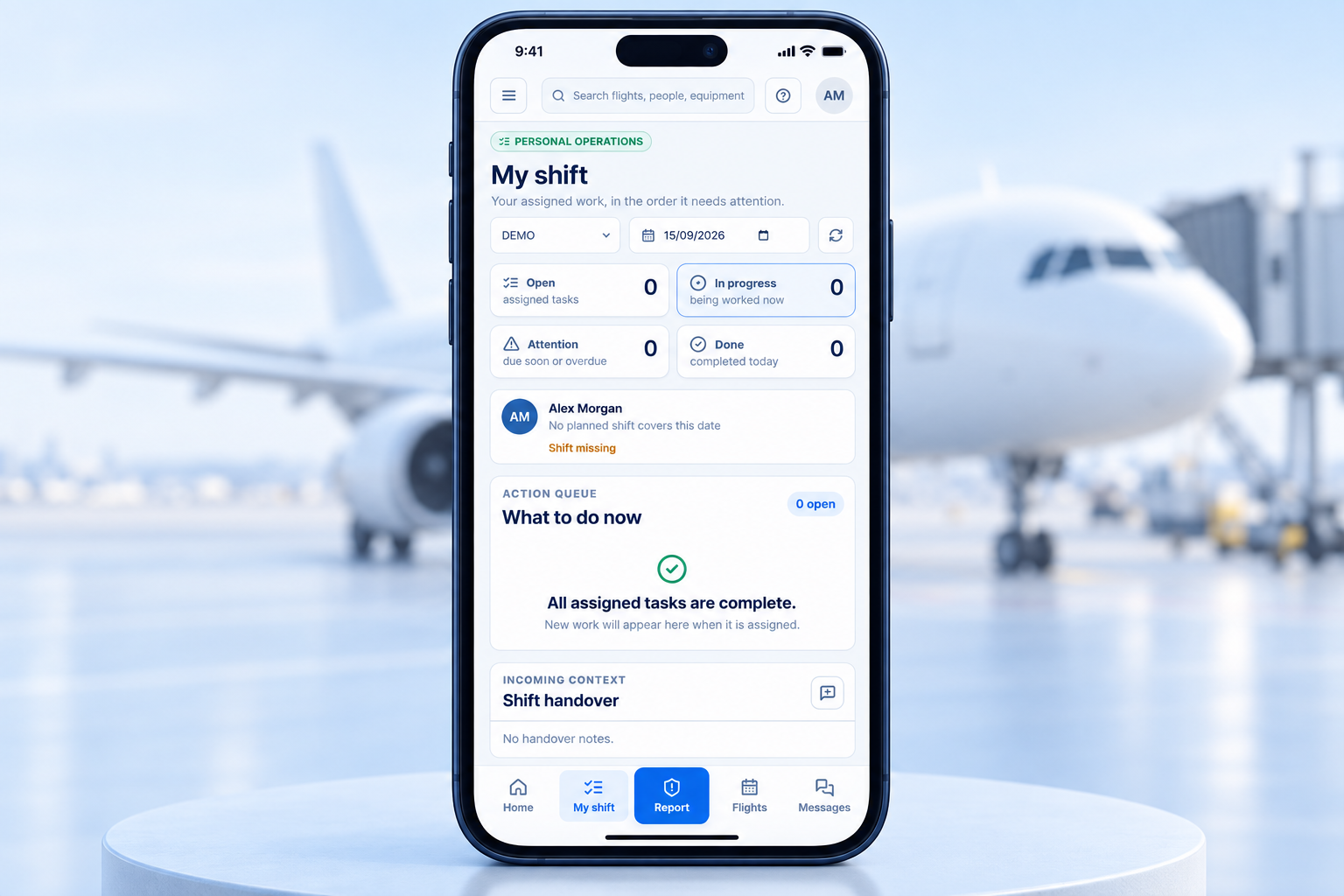
My Shift phone illustration with fictional Alex Morgan profile01 / EMPLOYEES

My Shift

Know what comes next. Keep assigned tasks, flight context and shift handover close at hand.

Explore My Shift PHONE · MOBILE WORKSPACE

GSE tablet illustration with demo equipment selection screen02 / EQUIPMENT

Skyelan GSE

A dedicated Android APK for equipment checks, readings and fault reporting on field tablets.

Explore equipment checks ANDROID APK · TABLET
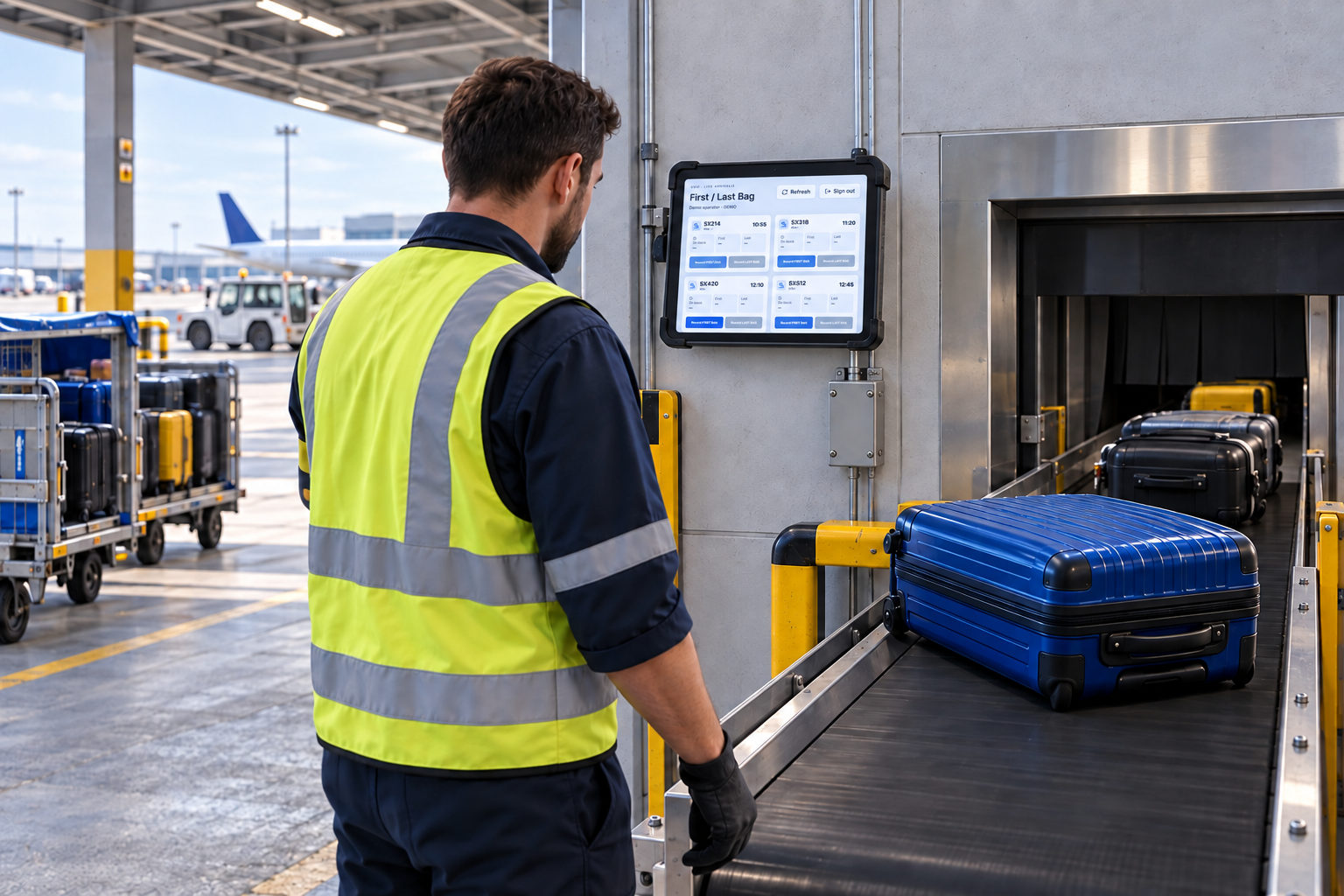
FLB tablet illustration in an airside baggage area03 / BAGGAGE

Skyelan FLB

First & Last Bag. Record baggage milestones at the point of delivery, against the right arriving flight.

Try the FLB preview ANDROID APK · TABLET

AI-generated device illustrations adapted from product screens, with fictional profiles and demo data.

FIRST & LAST BAG

Two moments.
One clear record.

Choose the arriving flight. Capture the first bag. Capture the last. Give the operation a shared view of baggage delivery milestones.

  • Station selection and PIN access
  • Arrival and on-block context
  • First bag and last bag timestamps

APK deployment and device setup are arranged with your organization.

Illustrated FLB tablet with flight cards at a staff-only baggage induction conveyor
AI-generated setting · FLB interface adapted with demo data
Try the interactive First & Last Bag preview
SkyelanFLBNTH · Demo station
BAGGAGE DELIVERY

Arriving flights

Interactive preview
SX 214WST → NTH
On block
Scheduled arrival
06:20
On block
06:24
First bag
Last bag
Try the two actions. All flight data is fictional.

PEOPLE & READINESS

The right people.
Ready for the next flight.

Bring people, shifts and qualifications into the same operational view. Plan coverage and assign work with availability and permit validity in sight.

Station team

Fictional profiles
Evan ColeRamp coordinatorAirside permit · Valid
Available
Nora BellTurnaround leadAirside permit · Valid
On flight
Maya ReedGSE technicianPermit renewal · 22 Sep
Available
Leo RowanPassenger servicesAirside permit · Valid
On flight

Shift planner

14–18 Sep 2026

Swipe to view the full shift plan →

Team memberMon 14Tue 15Wed 16Thu 17Fri 18
Evan C.06:00–14:0014:00–22:0006:00–14:00Rest day14:00–22:00
Nora B.14:00–22:0006:00–14:00Rest day14:00–22:0006:00–14:00
Maya R.06:00–14:00Rest day14:00–22:0006:00–14:0006:00–14:00
Leo R.Rest day14:00–22:0006:00–14:0006:00–14:0014:00–22:00
One permit renewal to reviewMaya Reed · Airside access · Expires 22 Sep 2026
Review
4 team members shown Assign by flight or task

SERVICES & COMMERCIAL CONTROL

Turn completed work
into billing-ready facts.

Connect operational delivery to commercial records —
without losing the detail of what was actually done.

Contract

Agreed scope & rates

Ordered service

Requested for the flight

Completed work

Confirmed by the team

Billing fact

Quantity, rate & evidence

Invoice review

Ready for approval

Flight service record

SX 214
Aster Air · Sample handling agreement Contract rates applied

Swipe to review service quantities and rates →

ServiceQuantityUnit rateBilling factStatus
Ground power connectionStandard contracted service34 min€1.20€40.80Confirmed
Potable waterService catalog · Flight order1 service€28.00€28.00Confirmed
Additional baggage loadingExtra service · Approved22 min€0.85€18.70Confirmed
Illustrative rates and service data Excel & PDF export

READY FOR INVOICE REVIEW

€87.50

3 confirmed service lines · SX 214
  • Linked to the customer contract
  • Completed work signed off
  • Supporting flight evidence retained
Sample values, not a customer quote.

QUALITY & SAFETY

Make every issue
visible. And owned.

Keep incidents, claims, checklists and corrective actions connected to the operation. Give each issue a clear owner, supporting evidence and a traceable history.

Record the facts in context

Capture observations, non-conformities and claims with flight, equipment and station references.

Keep the evidence together

Attach photos, documents and checklist findings to the same case.

Follow through to resolution

Assign responsible employees, track corrective work and preserve a read-only audit history.

Quality & safety case

DEMO
QH-026 Under review

Equipment positioning
at Stand B07

Safety observation · Northport station

Responsible employee Maya Reed
Corrective action due 17 Sep 2026
Review equipment staging procedure

Confirm marked positions and brief the ramp team.

Open
stand-b07-photo.jpg ramp-checklist.pdf
Audit history Read-only
Corrective action assignedNora Bell · 15 Sep 2026, 06:38 UTC
Observation recorded with 2 attachmentsMaya Reed · 15 Sep 2026, 06:32 UTC

REPORTING & VISIBILITY

Operational detail.
Decision-ready reporting.

Move from a station-wide view to the flight, service or asset behind it.
Filter the detail. Share the evidence. Export in the format you need.

Reports centerNorthport · NTH
Live06:42 UTC

Flight Summary

Sample operational data · 15–21 Sep 2026

Final flights24Sample reporting period
Service records98Confirmed work
GSE checks12Equipment inspections

Daily flight activity

Completed flights Sample values
Tue 15
Wed 16
Thu 17
Fri 18
Sat 19
Sun 20
Mon 21

Flight, service, claim, equipment, de-icing, qualification and billing reports — in one reporting center.

CONNECTED, NOT ISOLATED

Connect your operation.
Keep your existing systems.

Build the right integration plan for your stations, data sources and deployment. Skyelan sits at the center of the operational workflow — not in another silo.

Flight data

Schedule sources

Bring planned arrivals and departures into the operating picture.

Messaging

SITA / Type-B

Map operational messages into the right flight context.

Identity

Active Directory / LDAP

Use company directory authentication and identity controls.

Operations

Airline & airport systems

Plan data exchange around operational ownership.

Finance

Accounting systems

Move approved billing facts into the finance workflow.

Communication

Email

Connect operational correspondence and notifications.

Documents

Object storage

Connect controlled storage for photos and documents.

Migration

Legacy systems

Support a staged transition alongside existing tools.

Connector scope, availability and deployment requirements are confirmed during discovery.

ENTERPRISE CONTROL

Control access.
Preserve accountability.

Operational visibility should never mean unrestricted access. Keep permissions, documents and changes aligned with the responsibilities of each person and station.

Discuss security and deployment

Access in context

Sample permission profile

ROLETurnaround coordinator
STATIONNorthport · NTH
Flight & task updates Own station
Commercial pricing Restricted
Audit history Read-only

Role-based access

Give each role the tools and data it needs.

Station-scoped permissions

Keep operational access within assigned stations.

Company directory authentication

Align sign-in with your organization’s identity setup.

Immutable audit trail

Preserve attributable records of operational changes.

Encrypted connections

Protect data while it moves between clients and services.

Controlled document access

Keep attachments within the right permission boundaries.

Version-checked changes

Detect conflicting updates before they overwrite work.

Secure photo uploads

Apply access and validation controls to field evidence.

Operational data ownership

Define ownership, access and export responsibilities.

THE SKYELAN PLATFORM

Built around the whole operation.

One connected platform. Clear workspaces for each responsibility.

Operations

06
OverviewStation-wide live picture
My ShiftPrioritized personal work
Daily Flight PlanToday’s arrivals and departures
Scheduled FlightsPlan the upcoming operation
TurnaroundsOne workspace for every flight
MessagesOperational communication

Resources

05
StaffDirectory and shift planning
QualificationsSkills, permits and validity
GSEChecks, faults and repairs
De-icingService and operational records
AircraftAircraft and registration records

Commercial

04
ServicesCatalog and completed work
Contracts & PricingCustomer scope and rates
BillingFacts ready for invoice review
ReportsOperational and commercial insight

Quality

03
ChecklistsConsistent checks and evidence
Claims & IncidentsIssues and corrective actions
Audit LogTraceable change history

System

04
IntegrationsConnected systems and data
AttachmentsControlled files and photos
AdministrationWorkspace management
SettingsOperational configuration

A CLEARER WAY TO RUN YOUR OPERATION

Bring every turnaround
into one operational picture.

See how Skyelan can connect flights, people, services and equipment across your airport operations.

Flights. People. Services. Equipment.

LET’S SEE YOUR OPERATION

Book a Skyelan demo.

Explore the relevant workflows while demo enquiries are being prepared.

Demo enquiries · opening soon

Prepare your walkthrough.

Tell us about your stations, field teams and the first workflow you want to improve when enquiries open.

Online demo requests are not available yet. The planned contact address is info@skyelan.com.

Explore the platform →See how a deployment is scoped →

Prototype preview